Multi-Cluster Portal
Configure a centralized API Developer Portal on a parent cluster that aggregates and publishes APIs from multiple child clusters running in API Gateway mode.
Overview
Multi-cluster portal architecture enables you to centralize API management on a parent cluster while distributing API workloads across multiple child clusters. The parent cluster runs in API Management mode, hosting the portal, API catalog, and access control, while child clusters run in API Gateway mode, exposing backend services through uplinks.
This architecture is ideal for organizations managing APIs across different environments (dev, staging, prod), regions, or business units, where you want a single portal for discovery and management while keeping workloads distributed.
Key Benefits:
- Centralized Management: All APIM resources (portal, APIs, plans, catalog) on parent cluster
- Distributed Workloads: Backend APIs deployed across multiple child clusters
- Simplified Operations: Children run in API Gateway mode (no APIM license required on children)
- Environment Isolation: Each child cluster maintains independence while exposing services
Architecture
Configuration Example
Parent Cluster Setup
The parent cluster hosts all API Management resources and connects to child clusters via the multi-cluster provider.
1. Enable Multi-Cluster Provider
Configure the multi-cluster provider with child cluster addresses:
hub:
  providers:
    multicluster:
      enabled: true
      pollInterval: 5
      pollTimeout: 5
      children:
        cluster-a:
          address: "https://child-a.example.com:9443"
          serversTransport:
            insecureSkipVerify: true  # Use proper mTLS in production
        cluster-b:
          address: "https://child-b.example.com:9443"
          serversTransport:
            insecureSkipVerify: true
2. Create API Resources
Define API resources that reference multi-cluster services exposed by child clusters:
- IngressRoutes
- APIs
apiVersion: traefik.io/v1alpha1
kind: IngressRoute
metadata:
  name: crm-api
  namespace: apps
  annotations:
    hub.traefik.io/api: crm-api
spec:
  entryPoints:
    - websecure
  routes:
    - match: Host(`api.example.com`) && PathPrefix(`/crm`)
      kind: Rule
      services:
        - name: crm@multicluster
          kind: TraefikService
  tls: {}
apiVersion: traefik.io/v1alpha1
kind: IngressRoute
metadata:
  name: billing-api
  namespace: apps
  annotations:
    hub.traefik.io/api: billing-api
spec:
  entryPoints:
    - websecure
  routes:
    - match: Host(`api.example.com`) && PathPrefix(`/billing`)
      kind: Rule
      services:
        - name: billing@multicluster
          kind: TraefikService
  tls: {}
The hub.traefik.io/api annotation links each IngressRoute to its API resource. The service names crm@multicluster and billing@multicluster reference the uplinks from Child Cluster A and Child Cluster B respectively.
apiVersion: hub.traefik.io/v1alpha1
kind: API
metadata:
  name: crm-api
  namespace: apps
spec:
  title: "CRM API"
  description: "Customer Relationship Management API"
  openApiSpec:
    url: https://example.com/specs/crm-openapi.yaml
    override:
      servers:
        - url: https://api.example.com/crm
  cors:
    allowHeadersList: ["*"]
    allowOriginsList: ["*"]
    allowMethodsList: ["*"]
    maxAge: 86400
apiVersion: hub.traefik.io/v1alpha1
kind: API
metadata:
  name: billing-api
  namespace: apps
spec:
  title: "Billing API"
  description: "Billing and Invoicing API"
  openApiSpec:
    url: https://example.com/specs/billing-openapi.yaml
    override:
      servers:
        - url: https://api.example.com/billing
  cors:
    allowHeadersList: ["*"]
    allowOriginsList: ["*"]
    allowMethodsList: ["*"]
    maxAge: 86400
Use URL-based OpenAPI specs (url) instead of path-based (path) since the spec is fetched from the parent cluster, not the child.
3. Configure Portal and Catalog
Create the API portal and catalog items to control visibility and access:
- Portal
- Plans
- API Bundle & Catalog
apiVersion: hub.traefik.io/v1alpha1
kind: APIPortal
metadata:
  name: company-portal
  namespace: apps
spec:
  title: "Company API Portal"
  description: "Centralized portal for all company APIs"
  trustedUrls:
    - https://portal.example.com
  ui:
    logoUrl: https://company.example.com/logo.png
---
apiVersion: traefik.io/v1alpha1
kind: IngressRoute
metadata:
  name: company-portal
  namespace: apps
  annotations:
    hub.traefik.io/api-portal: company-portal
spec:
  entryPoints:
    - websecure
  routes:
    - match: Host(`portal.example.com`)
      kind: Rule
      services:
        - name: apiportal
          namespace: traefik
          port: 9903
  tls: {}
apiVersion: hub.traefik.io/v1alpha1
kind: APIPlan
metadata:
  name: standard-plan
  namespace: apps
spec:
  title: "Standard Plan"
  description: "Standard tier with basic rate limits"
  rateLimit:
    limit: 100
    period: 1m
  quota:
    limit: 10000
    period: 1h
---
apiVersion: hub.traefik.io/v1alpha1
kind: APIPlan
metadata:
  name: premium-plan
  namespace: apps
spec:
  title: "Premium Plan"
  description: "Premium tier with higher limits"
  rateLimit:
    limit: 1000
    period: 1m
  quota:
    limit: 100000
    period: 1h
apiVersion: hub.traefik.io/v1alpha1
kind: APIBundle
metadata:
  name: company-apis
  namespace: apps
spec:
  title: "Company API Bundle"
  description: "Collection of company APIs"
  apis:
    - name: crm-api
    - name: billing-api
---
apiVersion: hub.traefik.io/v1alpha1
kind: APICatalogItem
metadata:
  name: company-bundle-standard
  namespace: apps
spec:
  groups:
    - developers
    - external
  apiBundles:
    - name: company-apis
  apiPlan:
    name: standard-plan
---
apiVersion: hub.traefik.io/v1alpha1
kind: APICatalogItem
metadata:
  name: company-bundle-premium
  namespace: apps
spec:
  groups:
    - premium-customers
  apiBundles:
    - name: company-apis
  apiPlan:
    name: premium-plan
Child Cluster Setup
Child clusters run in API Gateway mode and only need uplink configuration and backend services. No APIM resources are required.
1. Configure Uplink Entrypoint
Enable the uplink entrypoint in the child cluster's Traefik configuration:
hub:
  providers:
    multicluster:
      enabled: true

ports:
  multicluster:
    port: 9443
    uplink: true

additionalArguments:
  - --hub.uplinkEntryPoints.multicluster.http.tls=true
2. Create Uplink and Service
Each child cluster exposes its API through an uplink. Child Cluster A serves the CRM API and Child Cluster B serves the Billing API.
- Child A — CRM API
- Child B — Billing API
apiVersion: hub.traefik.io/v1alpha1
kind: Uplink
metadata:
  name: crm
  namespace: apps
spec:
  exposeName: crm
  entryPoints:
    - multicluster
  healthCheck:
    interval: 5s
    timeout: 3s
    path: /crm/health
    method: GET
apiVersion: traefik.io/v1alpha1
kind: IngressRoute
metadata:
  name: crm-api
  namespace: apps
  annotations:
    hub.traefik.io/router.uplinks: crm
spec:
  entryPoints:
    - web
  routes:
    - match: PathPrefix(`/crm`)
      kind: Rule
      services:
        - name: crm-service
          port: 80
      middlewares:
        - name: strip-crm-prefix
---
apiVersion: traefik.io/v1alpha1
kind: Middleware
metadata:
  name: strip-crm-prefix
  namespace: apps
spec:
  stripPrefix:
    prefixes:
      - /crm
apiVersion: v1
kind: Service
metadata:
  name: crm-service
  namespace: apps
spec:
  selector:
    app: crm-backend
  ports:
    - port: 80
      targetPort: 8080
---
apiVersion: apps/v1
kind: Deployment
metadata:
  name: crm-backend
  namespace: apps
spec:
  replicas: 2
  selector:
    matchLabels:
      app: crm-backend
  template:
    metadata:
      labels:
        app: crm-backend
    spec:
      containers:
        - name: crm-api
          image: company/crm-api:latest
          ports:
            - containerPort: 8080
apiVersion: hub.traefik.io/v1alpha1
kind: Uplink
metadata:
  name: billing
  namespace: apps
spec:
  exposeName: billing
  entryPoints:
    - multicluster
  healthCheck:
    interval: 5s
    timeout: 3s
    path: /billing/health
    method: GET
apiVersion: traefik.io/v1alpha1
kind: IngressRoute
metadata:
  name: billing-api
  namespace: apps
  annotations:
    hub.traefik.io/router.uplinks: billing
spec:
  entryPoints:
    - web
  routes:
    - match: PathPrefix(`/billing`)
      kind: Rule
      services:
        - name: billing-service
          port: 80
      middlewares:
        - name: strip-billing-prefix
---
apiVersion: traefik.io/v1alpha1
kind: Middleware
metadata:
  name: strip-billing-prefix
  namespace: apps
spec:
  stripPrefix:
    prefixes:
      - /billing
apiVersion: v1
kind: Service
metadata:
  name: billing-service
  namespace: apps
spec:
  selector:
    app: billing-backend
  ports:
    - port: 80
      targetPort: 8080
---
apiVersion: apps/v1
kind: Deployment
metadata:
  name: billing-backend
  namespace: apps
spec:
  replicas: 2
  selector:
    matchLabels:
      app: billing-backend
  template:
    metadata:
      labels:
        app: billing-backend
    spec:
      containers:
        - name: billing-api
          image: company/billing-api:latest
          ports:
            - containerPort: 8080
The IngressRoute on child clusters should not include a Host matcher when using uplinks. Use PathPrefix only to ensure proper routing from the parent cluster.
Important Considerations
APIM Licensing
- Parent cluster: Requires Traefik Hub with API Management enabled (APIM license)
- Child clusters: Only require API Gateway mode (no APIM license needed)
This architecture minimizes licensing costs by centralizing APIM on the parent while children run as lightweight API gateways.
OpenAPI Specification
When API resources are on the parent cluster, use URL-based OpenAPI specs (openApiSpec.url) rather than path-based specs (openApiSpec.path).
The parent cluster needs to fetch the spec independently, not from the child cluster endpoints.
# ✅ Correct - URL-based spec
spec:
  openApiSpec:
    url: https://specs.example.com/crm-api.yaml

# ❌ Incorrect - Path-based spec won't work from parent
spec:
  openApiSpec:
    path: /openapi.yaml
Child Cluster Routing
Child cluster IngressRoutes should use PathPrefix matchers only, without Host matchers, to ensure proper routing through the multi-cluster provider:
# ✅ Correct - PathPrefix only
spec:
  routes:
    - match: PathPrefix(`/crm`)

# ❌ Incorrect - Host matcher will interfere
spec:
  routes:
    - match: Host(`api.example.com`) && PathPrefix(`/crm`)
The parent cluster's IngressRoute handles the Host matching.
Namespace Consistency
All APIM resources on the parent cluster (APIPortal, API, APIPlan, APICatalogItem) must be in the same namespace for the portal to discover and display them correctly.
Verification and Testing
After deploying the configuration, verify that the multi-cluster portal setup is working correctly.
1. Check Uplink Connectivity
On the parent cluster, verify that uplinks to child clusters are established:
# Check uplink status in Traefik logs
kubectl logs -n traefik deployment/traefik | grep -i uplink

# Or check the multi-cluster provider status
kubectl logs -n traefik deployment/traefik | grep -i multicluster
You should see logs indicating successful connections to child cluster addresses.
2. Verify API Portal Access
Test that the portal is accessible and displaying your APIs:
# Access the portal (replace with your portal URL)
curl -k https://portal.example.com

# Or open in browser
open https://portal.example.com
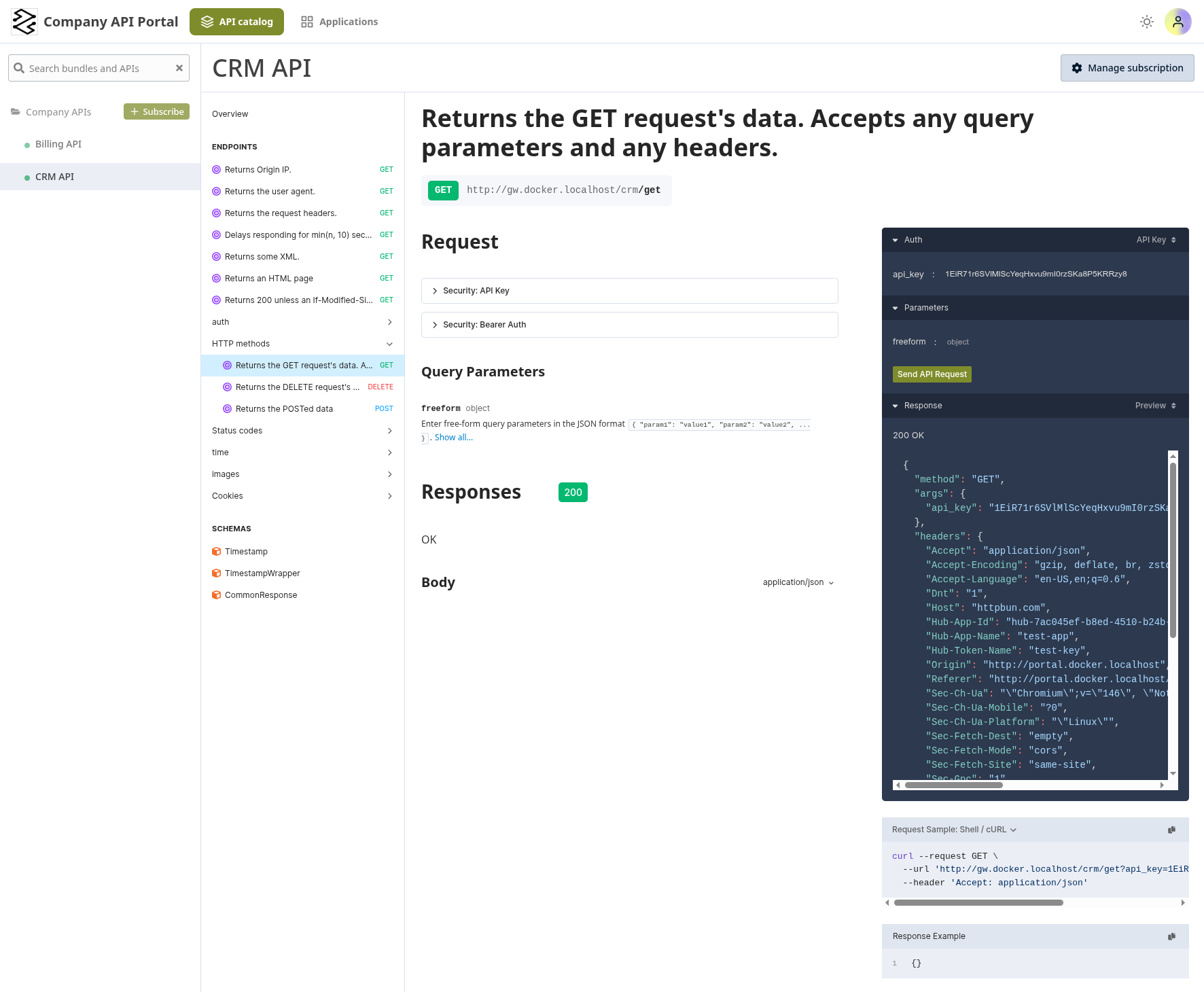
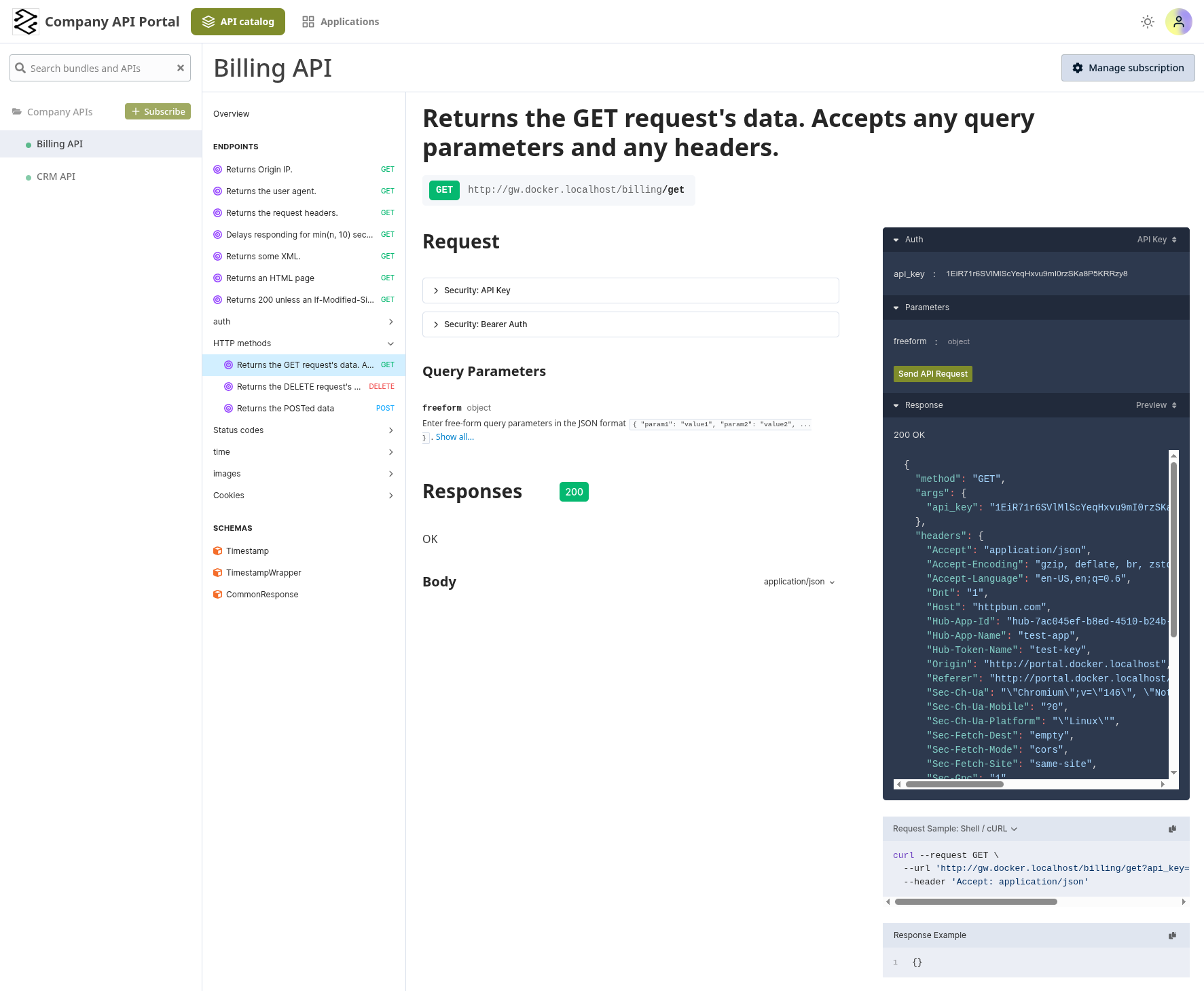
The portal should load and display the APIs you've published through catalog items.
- CRM API
- Billing API
3. Test API Endpoints
Verify that API requests are routed correctly through the multi-cluster setup:
# Test the CRM API on Child Cluster A
curl -k https://api.example.com/crm/health

# Test the Billing API on Child Cluster B
curl -k https://api.example.com/billing/health

# Test with authentication if required
curl -k -H "Authorization: Bearer <token>" \
  https://api.example.com/crm/employees

curl -k -H "Authorization: Bearer <token>" \
  https://api.example.com/billing/invoices
4. Confirm Multi-Cluster Routing
Verify that each API is served by its respective child cluster by adding tracing headers. Add this middleware on each child cluster with the cluster name as the value:
- Child A — CRM API
- Child B — Billing API
apiVersion: traefik.io/v1alpha1
kind: Middleware
metadata:
  name: backend-headers
  namespace: apps
spec:
  headers:
    customResponseHeaders:
      X-Traefik-Backend: "cluster-a"
Add the middleware to the CRM IngressRoute:
spec:
  routes:
    - match: PathPrefix(`/crm`)
      kind: Rule
      services:
        - name: crm-service
          port: 80
      middlewares:
        - name: backend-headers
        - name: strip-crm-prefix
apiVersion: traefik.io/v1alpha1
kind: Middleware
metadata:
  name: backend-headers
  namespace: apps
spec:
  headers:
    customResponseHeaders:
      X-Traefik-Backend: "cluster-b"
Add the middleware to the Billing IngressRoute:
spec:
  routes:
    - match: PathPrefix(`/billing`)
      kind: Rule
      services:
        - name: billing-service
          port: 80
      middlewares:
        - name: backend-headers
        - name: strip-billing-prefix
Then verify that each API returns a different cluster header:
# CRM API should return X-Traefik-Backend: cluster-a
curl -k -s -D - https://api.example.com/crm/health | grep X-Traefik-Backend

# Billing API should return X-Traefik-Backend: cluster-b
curl -k -s -D - https://api.example.com/billing/health | grep X-Traefik-Backend
5. Verify API Catalog Items
Check that APIs appear in the portal for the correct user groups:
- Log into the portal with a user from the configured group (e.g.,
developers) - Verify the API appears in the catalog
- Check that the correct plan is associated (Standard or Premium)
- Test API access through the portal's built-in API client
6. Test Health Checks
If you configured health checks on uplinks, verify they're working on each child cluster:
# On Child Cluster A — CRM API
kubectl exec -n apps deployment/crm-backend -- \
  curl http://localhost:8080/health

# On Child Cluster B — Billing API
kubectl exec -n apps deployment/billing-backend -- \
  curl http://localhost:8080/health
Both health check endpoints should return a successful response.
Related Content
- Learn more about Multi-Cluster Routing
- Configure API Portal Authentication
- Explore API Catalog Items for controlling API visibility
- Review API Plans for rate limiting and quotas
- Check Uplink CRD reference
