APIAuth
Configure API authentication with the APIAuth Custom Resource Definition (CRD).
Introduction
The APIAuth resource provides a declarative way to configure authentication for your APIs in Traefik Hub API Management. This resource works in both online and offline environments, allowing you to manage API authentication
settings through Kubernetes manifests.
APIAuth enables per-namespace authentication overrides, allowing you to run different authentication methods on the same gateway by placing APIs in different namespaces. Previously, this required separate Hub workspaces
and separate gateways. Now your workspace settings act as a "global default" that you can override on a per-namespace basis with CRDs.
When defined, the CRD configuration takes precedence over workspace-level dashboard settings.
APIAuth works seamlessly in both online and offline modes.
In online environments, it integrates fully with self-service & managed applications, allowing users to create API keys through the Developer Portal
while respecting the authentication method defined in the APIAuth resource.
In offline environments where connectivity to the Traefik Hub Online Dashboard is restricted, APIAuth allows you to maintain full control
over API authentication while operating in air-gapped environments.
Example Use Case: You can now have APIs in the payments namespace using JWT authentication, APIs in the public namespace using API Key authentication, and APIs in the internal namespace using your workspace default
authentication method - all on the same gateway!
The APIAuth resource supports four authentication methods:
- API Key Authentication: Key-based authentication with API keys
- JWT Authentication: Token-based authentication using JSON Web Tokens
- LDAP Authentication: Basic Auth authentication validated against LDAP servers
- Keyless Authentication: No credentials required, the API is publicly accessible
Namespace Scope and Default Behavior
The APIAuth CRD is namespace-scoped, meaning it applies to all APIs within the same namespace by default. This design follows the principle of least privilege while providing convenient management for APIs grouped by namespace.
Authentication settings resolve with the following precedence, from lowest to highest priority:
- Workspace default: configured in the Traefik Hub Dashboard UI, applies to every namespace that has no
APIAuthof its own. - Namespace default: an
APIAuthresource withisDefault: true, applies to every API in its namespace. - Per-API / per-Version override: the
apiAuthsfield on anAPIorAPIVersionresource, applies only to that API or version. See Per-API and Per-Version Authentication.
Before per-API authentication (available from Gateway v3.21.0), running different authentication methods for different APIs required putting them in separate namespaces, each with its own default APIAuth.
You can still do that, but it's no longer required: use apiAuths to mix authentication methods for APIs that share a namespace, for example a keyless API alongside an API Key-protected one. See Per-API and Per-Version Authentication.
isDefault Behavior
APIAuth resources are only recognized when isDefault is set to true. Resources with isDefault: false or without this property will be ignored by the system. When isDefault: true is configured,
the authentication method applies to all APIs within the same namespace. If multiple APIAuth resources exist in a namespace with isDefault: true, the system will use the first one when sorted alphabetically by name.
Configuration Example
Basic Structure
- API Key
- JWT
- LDAP
- Keyless
apiVersion: hub.traefik.io/v1alpha1
kind: APIAuth
metadata:
  name: auth-config
  namespace: apps
spec:
  isDefault: true
  apiKey: {} # API Key authentication
apiVersion: hub.traefik.io/v1alpha1
kind: APIAuth
metadata:
  name: auth-config
  namespace: default
spec:
  isDefault: true
  jwt: {} # JWT authentication
apiVersion: hub.traefik.io/v1alpha1
kind: APIAuth
metadata:
  name: auth-config
  namespace: default
spec:
  isDefault: true
  ldap:
    url: ldaps://ldap.example.com:636
    baseDn: dc=example,dc=org
    bindDn: cn=admin,dc=example,dc=org
    bindPasswordSecretName: ldap-bind-secret
    searchFilter: (&(objectClass=inetOrgPerson)(uid=%s))
apiVersion: hub.traefik.io/v1alpha1
kind: APIAuth
metadata:
  name: keyless-auth
  namespace: public
spec:
  isDefault: true
  keyless: {} # No credentials required
Configuration Options
| Field | Description | Required | Default |
|---|---|---|---|
isDefault | Specifies if this APIAuth should be the default authentication method for the namespace. | Yes | - |
| Authentication Method | Exactly one of apiKey, jwt, ldap, or keyless must be specified. | Yes | - |
API Key Authentication
API Key authentication provides an authentication method using pre-shared keys. In online environments, users can create self-service applications and generate API keys through the Developer Portal. In offline or declarative scenarios, API keys are managed by ManagedApplication resources.
Configuration Example
apiVersion: hub.traefik.io/v1alpha1
kind: APIAuth
metadata:
  name: apikey-auth
  namespace: production
spec:
  isDefault: true
  apiKey: {}
With this minimal configuration, Traefik Hub extracts API keys from the default locations: the Authorization header with the Bearer scheme (Authorization: Bearer <api-key>) and the api_key query parameter.
Authentication is handled through API keys created either via self-service applications in the Developer Portal or through ManagedApplication resources.
Configuration Options
| Field | Description | Required | Default |
|---|---|---|---|
apiKey.keySource | Defines where to extract the API key from incoming requests. When omitted, default extraction locations are used. When specified, it completely overrides the defaults — any field left empty disables that extraction method. At least one of header or query must be set. | No | See description |
apiKey.keySource.header | Name of the HTTP header containing the API key. | No | Authorization |
apiKey.keySource.headerAuthScheme | Authentication scheme prefix used to parse the header value, in the format <scheme> <token>. Only applies when header is Authorization. | No | Bearer |
apiKey.keySource.query | Name of the query parameter containing the API key. | No | api_key |
- If
keySourceis not set, both default locations are accepted: theAuthorization: Bearer <key>header and theapi_keyquery parameter. - If
keySourceis set, only the locations explicitly defined are accepted. For example, setting onlyheaderdisables query parameter extraction entirely.
Customizing API Key Extraction
Use keySource when you need API keys to be supplied in a non-default location, such as a custom header, a different query parameter name, or with a custom authentication scheme.
- Custom Header
- Custom Query Parameter
- Header and Query
apiVersion: hub.traefik.io/v1alpha1
kind: APIAuth
metadata:
  name: apikey-custom-header
  namespace: production
spec:
  isDefault: true
  apiKey:
    keySource:
      header: X-API-Key
API keys are extracted from the X-API-Key header only. The default Authorization header and api_key query parameter are not enabled.
apiVersion: hub.traefik.io/v1alpha1
kind: APIAuth
metadata:
  name: apikey-custom-query
  namespace: production
spec:
  isDefault: true
  apiKey:
    keySource:
      query: token
API keys are extracted from the token query parameter only.
apiVersion: hub.traefik.io/v1alpha1
kind: APIAuth
metadata:
  name: apikey-header-and-query
  namespace: production
spec:
  isDefault: true
  apiKey:
    keySource:
      header: Authorization
      headerAuthScheme: ApiKey
      query: api_key
API keys can be supplied either in the Authorization header using the ApiKey scheme (Authorization: ApiKey <key>) or in the api_key query parameter.
- At least one of
headerorquerymust be set whenkeySourceis provided. headerAuthSchemecan only be used whenheaderis set toAuthorization. Using it with any other header name is rejected by validation.
JWT Authentication
JWT authentication validates JSON Web Tokens using various verification methods.
Configuration Example
apiVersion: hub.traefik.io/v1alpha1
kind: APIAuth
metadata:
  name: jwt-auth
  namespace: production
spec:
  isDefault: true
  jwt:
    appIdClaim: azp
    jwksUrl: https://auth.example.com/.well-known/jwks.json
Configuration Options
| Field | Description | Required | Default |
|---|---|---|---|
jwt.appIdClaim | Name of the JWT claim containing the application identifier | Yes | - |
jwt.trustedIssuers | List of trusted JWT issuers with their JWKS endpoints. See Multiple Trusted Issuers for details. Recommended for multi-tenant scenarios. | No | - |
jwt.jwksUrl | URL to fetch JWKS for JWT verification. For multi-tenant scenarios with multiple identity providers, consider using trustedIssuers instead. | No | - |
jwt.jwksFile | JWKS file content for JWT verification. | No | - |
jwt.publicKey | PEM-encoded public key for JWT verification. | No | - |
jwt.signingSecretName | Name of Kubernetes Secret containing signing secret. The secret must be of type Opaque and contain a key named value. | No | - |
jwt.stripAuthorizationHeader | Whether to strip Authorization header before forwarding. | No | false |
jwt.tokenQueryKey | Query parameter name for JWT token. If not set, only the Authorization header is used. | No | - |
jwt.forwardHeaders | Additional headers to forward with the request. | No | - |
jwt.tokenNameClaim | JWT claim for token name (used in metrics). | No | - |
Exactly one of trustedIssuers, jwksUrl, jwksFile, publicKey, or signingSecretName must be specified.
Multiple Trusted Issuers
The trustedIssuers field enables a single APIAuth resource to validate JWTs from multiple identity providers, making it ideal for multi-tenant scenarios where different tenants use different
identity providers (for example, Tenant A uses Auth0, Tenant B uses Okta, Tenant C uses Azure AD).
Each trusted issuer configuration includes:
jwksUrl(required): The HTTPS URL to fetch the JWKS fromissuer(optional): The expected value of theissclaim in the JWT
Issuer Validation:
- When
issueris specified, tokens must have this exact issuer value to be validated against this JWKS - When
issueris omitted, this JWKS acts as a fallback for tokens from any issuer - Only one fallback entry (without
issuer) is allowed perAPIAuthresource - Issuer values must be unique across all entries
Configuration Options:
| Field | Description | Required | Constraints |
|---|---|---|---|
trustedIssuers[].jwksUrl | HTTPS URL to fetch the JWKS from | Yes | Must be a valid HTTPS URL |
trustedIssuers[].issuer | Expected value of the iss claim | No | Must be unique if specified |
Example Configurations:
- Multiple Specific Issuers
- Mix of Specific and Fallback
- Single Fallback
apiVersion: hub.traefik.io/v1alpha1
kind: APIAuth
metadata:
  name: multi-tenant-auth
  namespace: default
spec:
  isDefault: true
  jwt:
    appIdClaim: sub
    trustedIssuers:
      - jwksUrl: "https://tenant-a.auth0.com/.well-known/jwks.json"
        issuer: "https://tenant-a.auth0.com/"
      - jwksUrl: "https://tenant-b.okta.com/.well-known/jwks.json"
        issuer: "https://tenant-b.okta.com/"
      - jwksUrl: "https://tenant-c.azuread.net/.well-known/jwks.json"
        issuer: "https://tenant-c.azuread.net/"
This configuration validates tokens from three different identity providers, each with explicit issuer validation.
apiVersion: hub.traefik.io/v1alpha1
kind: APIAuth
metadata:
  name: mixed-auth
  namespace: default
spec:
  isDefault: true
  jwt:
    appIdClaim: client_id
    trustedIssuers:
      - jwksUrl: "https://primary.example.com/.well-known/jwks.json"
        issuer: "https://primary.example.com/"
      - jwksUrl: "https://fallback.example.com/.well-known/jwks.json"
This configuration validates tokens from a specific issuer and includes a fallback JWKS for tokens from other issuers.
apiVersion: hub.traefik.io/v1alpha1
kind: APIAuth
metadata:
  name: fallback-auth
  namespace: default
spec:
  isDefault: true
  jwt:
    appIdClaim: sub
    trustedIssuers:
      - jwksUrl: "https://auth.example.com/.well-known/jwks.json"
This configuration validates tokens from any issuer using a single JWKS endpoint.
- Maximum of 100 trusted issuers per
APIAuthresource - All
jwksUrlvalues must use HTTPS - Issuer values must match exactly, including trailing slashes and URL encoding
- Only one trusted issuer may omit the
issuerfield (acting as a fallback) trustedIssuersis mutually exclusive withjwksUrl,jwksFile,publicKey, andsigningSecretName
JWT Verification Methods
Choose the appropriate JWT verification method based on your authentication provider:
- Trusted Issuers
- JWKS URL
- JWKS File
- Public Key
- Signing Secret
apiVersion: hub.traefik.io/v1alpha1
kind: APIAuth
metadata:
  name: trusted-issuers-auth
  namespace: default
spec:
  isDefault: true
  jwt:
    appIdClaim: sub
    trustedIssuers:
      - jwksUrl: "https://issuer1.example.com/.well-known/jwks.json"
        issuer: "https://issuer1.example.com/"
      - jwksUrl: "https://issuer2.example.com/.well-known/jwks.json"
        issuer: "https://issuer2.example.com/"
Use this method for multi-tenant scenarios or when you need to support multiple identity providers. See Multiple Trusted Issuers for detailed information.
apiVersion: hub.traefik.io/v1alpha1
kind: APIAuth
metadata:
  name: jwks-auth
  namespace: default
spec:
  isDefault: true
  jwt:
    appIdClaim: azp
    jwksUrl: https://auth.example.com/.well-known/jwks.json
Use this method when your JWT issuer provides a JWKS endpoint. Most OAuth2 providers support this.
apiVersion: hub.traefik.io/v1alpha1
kind: APIAuth
metadata:
  name: jwks-file-auth
  namespace: default
spec:
  isDefault: true
  jwt:
    appIdClaim: client_id
    jwksFile: |
      {
        "keys": [
          {
            "kty": "RSA",
            "kid": "example-key-id",
            "use": "sig",
            "n": "...",
            "e": "AQAB"
          }
        ]
      }
Use this method for static JWKS configuration when you have the key set available.
apiVersion: hub.traefik.io/v1alpha1
kind: APIAuth
metadata:
  name: pubkey-auth
  namespace: default
spec:
  isDefault: true
  jwt:
    appIdClaim: sub
    publicKey: |
      -----BEGIN PUBLIC KEY-----
      MIIBIjANBgkqhkiG9w0BAQEFAAOCAQ8AMIIBCgKCAQEA...
      -----END PUBLIC KEY-----
Use this method when you have a static public key for verification.
apiVersion: hub.traefik.io/v1alpha1
kind: APIAuth
metadata:
  name: secret-auth
  namespace: default
spec:
  isDefault: true
  jwt:
    appIdClaim: aud
    signingSecretName: jwt-signing-secret

---
apiVersion: v1
kind: Secret
metadata:
  name: jwt-signing-secret
  namespace: default
type: Opaque
data:
  value: <base64-encoded-secret>
Use this method for symmetric key verification with secrets stored in Kubernetes.
OAuth2 Provider Integration
Single Provider
Below is an example of how to configure APIAuth for Auth0:
apiVersion: hub.traefik.io/v1alpha1
kind: APIAuth
metadata:
  name: auth0-integration
  namespace: api-services
spec:
  isDefault: true
  jwt:
    appIdClaim: azp
    jwksUrl: https://your-domain.auth0.com/.well-known/jwks.json
    forwardHeaders:
      X-User-ID: sub
      X-User-Email: email
Multiple Providers (Multi-Tenant)
For multi-tenant scenarios where different customers use different OAuth2 providers, use trustedIssuers:
apiVersion: hub.traefik.io/v1alpha1
kind: APIAuth
metadata:
  name: multi-tenant-oauth2
  namespace: api-services
spec:
  isDefault: true
  jwt:
    appIdClaim: azp
    trustedIssuers:
      # Tenant A using Auth0
      - jwksUrl: https://tenant-a.auth0.com/.well-known/jwks.json
        issuer: https://tenant-a.auth0.com/
      # Tenant B using Okta
      - jwksUrl: https://tenant-b.okta.com/oauth2/default/.well-known/jwks.json
        issuer: https://tenant-b.okta.com/oauth2/default
      # Tenant C using Azure AD
      - jwksUrl: https://login.microsoftonline.com/tenant-c-id/discovery/v2.0/keys
        issuer: https://login.microsoftonline.com/tenant-c-id/v2.0
    forwardHeaders:
      X-User-ID: sub
      X-User-Email: email
LDAP Authentication
LDAP authentication validates API requests using Basic Authentication credentials against an LDAP server. This method is particularly useful for organizations that already have an LDAP infrastructure and want to leverage it for API authentication.
How LDAP Authentication Works
When using LDAP authentication with APIAuth:
- API consumers send requests with Basic Auth credentials (
Authorization: Basic <base64(username:password)>) - The username from Basic Auth must match an
appIdin a ManagedApplication resource - Traefik Hub validates the credentials against the configured LDAP server
- If both LDAP authentication succeeds AND the application has valid access via ManagedSubscription, the request proceeds
LDAP authentication for APIs requires:
- Valid LDAP credentials (username/password validated against LDAP)
- A ManagedApplication with
appIdmatching the LDAP username - A ManagedSubscription granting that application access to the API
Configuration Example
apiVersion: hub.traefik.io/v1alpha1
kind: APIAuth
metadata:
  name: ldap-auth
  namespace: production
spec:
  isDefault: true
  ldap:
    url: ldaps://ldap.example.com:636
    baseDn: dc=example,dc=org
    bindDn: cn=admin,dc=example,dc=org
    bindPasswordSecretName: ldap-bind-secret
    searchFilter: (&(objectClass=inetOrgPerson)(uid=%s))
Configuration Options
| Field | Description | Required | Default |
|---|---|---|---|
ldap.url | LDAP server URL, including protocol (ldap:// or ldaps://) and port (for example, ldaps://ldap.example.com:636) | Yes | - |
ldap.baseDn | Base domain name for bind and search queries (for example, dc=example,dc=org) | Yes | - |
ldap.bindDn | Domain name to bind for authentication when running in search mode. If empty, anonymous bind is used (not recommended for production) | No | - |
ldap.bindPasswordSecretName | Name of Kubernetes Secret containing the bind password (must be the value of a key named password) | No | - |
ldap.attribute | LDAP object attribute used to form bind DN. Bind DN format: <attribute>=<username>,<baseDn> | No | cn |
ldap.searchFilter | LDAP search filter query. Use %s as placeholder for username (for example, (&(objectClass=inetOrgPerson)(uid=%s))) | No | - |
ldap.startTLS | Enable StartTLS when initializing connection with LDAP server | No | false |
ldap.insecureSkipVerify | Skip TLS certificate verification (not recommended for production) | No | false |
ldap.certificateAuthority | PEM-encoded certificate for TLS connection with custom Certificate Authority | No | - |
LDAP Bind Password Secret
Create a Kubernetes Secret containing the LDAP bind password:
- kubectl
- YAML
kubectl create secret generic ldap-bind-secret \
  --from-literal=password=your-bind-password \
  -n production
apiVersion: v1
kind: Secret
metadata:
  name: ldap-bind-secret
  namespace: apps
type: Opaque
data:
  password: <base64-encoded-bind-password>
The LDAP bind password secret must contain a key named password.
LDAP Provider Examples
- OpenLDAP
- Active Directory
- Oracle Internet Directory
apiVersion: hub.traefik.io/v1alpha1
kind: APIAuth
metadata:
  name: openldap-api-auth
  namespace: apps
spec:
  isDefault: true
  ldap:
    url: ldaps://openldap.example.com:636
    baseDn: dc=example,dc=org
    bindDn: cn=admin,dc=example,dc=org
    bindPasswordSecretName: ldap-bind-secret
    searchFilter: (&(objectClass=inetOrgPerson)(uid=%s))
apiVersion: hub.traefik.io/v1alpha1
kind: APIAuth
metadata:
  name: ad-api-auth
  namespace: apps
spec:
  isDefault: true
  ldap:
    url: ldaps://ad.example.com:636
    baseDn: dc=example,dc=com
    bindDn: cn=Service Account,ou=Service Accounts,dc=example,dc=com
    bindPasswordSecretName: ad-bind-secret
    searchFilter: (&(objectClass=user)(sAMAccountName=%s))
apiVersion: hub.traefik.io/v1alpha1
kind: APIAuth
metadata:
  name: oid-api-auth
  namespace: apps
spec:
  isDefault: true
  ldap:
    url: ldaps://oid.example.com:636
    baseDn: dc=example,dc=com
    bindDn: cn=orcladmin
    bindPasswordSecretName: oid-bind-secret
    searchFilter: (&(objectClass=person)(uid=%s))
LDAP with ManagedApplications
When using LDAP authentication, create ManagedApplication resources where the appId matches the LDAP username:
apiVersion: hub.traefik.io/v1alpha1
kind: ManagedApplication
metadata:
  name: john-doe-app
  namespace: apps
spec:
  appId: john.doe  # Must match LDAP username
  owner: john.doe  # LDAP username
  notes: "Application for John Doe"
  # No apiKeys section needed - authentication is done via LDAP
For production systems, it's recommended to use separate LDAP accounts for the owner (human user) and appId (machine/application user):
apiVersion: hub.traefik.io/v1alpha1
kind: ManagedApplication
metadata:
  name: website-app
  namespace: apps
spec:
  appId: svc.website     # Machine user - authenticates API requests
  owner: john.doe        # Human user - manages app in portal
  notes: "Website backend service"
This separation provides operational resilience:
- API requests use the machine user credentials (
svc.website) - Portal access is managed by the human user (
john.doe) - If
john.doeleaves the company, thesvc.websiteservice account continues to function without disruption - The
ownercan be reassigned to a different human user, allowing the new owner to manage the application in the portal
This pattern is especially important for long-running services and prevents service disruption due to employee turnover.
When the user john.doe makes a request with Basic Auth using their LDAP password, Traefik Hub will:
- Validate the credentials against LDAP
- Match the username
john.doeto theappIdin the ManagedApplication - Check if a ManagedSubscription grants access to the API
- Allow or deny the request based on all validations
Keyless Authentication
Keyless authentication exposes an API publicly, without requiring any credentials. Traefik Hub's authentication step accepts every request, and credentials sent with the request are passed to the back end unchecked.
Configuration Example
apiVersion: hub.traefik.io/v1alpha1
kind: APIAuth
metadata:
  name: keyless-auth
  namespace: production
spec:
  isDefault: true
  keyless: {}
The keyless field accepts an empty object. It has no additional configuration options.
How Keyless Authentication Affects Enforcement
Keyless APIs have no consumer identity attached to a request, so Traefik Hub API Management can't tie a plan, quota, or rate limit to a specific application, and it doesn't enforce subscriptions on these APIs.
To still control traffic to a keyless API, apply Traefik's RateLimit middleware or another custom middleware directly to the route. These middlewares can rate limit by criteria other than consumer identity, such as source IP. Keyless authentication only controls whether the request needs a credential to pass, so custom middleware, such as OPA or Forward Auth, still applies to a keyless API's routes for advanced authorization needs.
Don't attach an apiPlan to a keyless API's CatalogItem. Traefik Hub accepts the configuration, but never enforces it.
Keyless requests carry no consumer identity to check the plan's rate limit or quota against.
To control traffic on a keyless API, use the RateLimit middleware or other custom middleware instead.
On the Developer Portal, a keyless API is always available to any consumer who can see it through a CatalogItem. Subscribing to a keyless API has no effect. Keyless requests carry no application identity, so Traefik Hub can't check them against any subscription.
The Portal and the API run on different origins, so the browser blocks the Portal's Try It panel unless the API resource allows that origin.
Configure cors on the API resource before testing a keyless API this way.
Per-API and Per-Version Authentication
The apiAuths field on an API or APIVersion resource overrides the namespace default for that API or version alone, referencing one or more APIAuth resources from the same namespace instead of
relying on the namespace's isDefault: true resource.
This removes the namespace as the smallest unit of authentication control: APIs that share a namespace can each use a different method, and a single API can even use different methods for different operations.
How the Authentication Chain Works
apiAuths is an ordered list of APIAuth references. Unlike the namespace default, which picks a single APIAuth for every API in the namespace, a chain lets you combine several authentication methods
on one API and control which operations each one applies to.
- Entries are evaluated in order, top to bottom. For a given request, Hub finds the first entry whose
operationFiltercovers that operation and tries its authentication method. If authentication with that entry doesn't succeed, Hub tries the next entry that also covers the operation, and so on. When every matching entry fails, the client gets the most severe rejection: a server error outranks a403, and a403outranks a401. A401response carries theWWW-Authenticatechallenge of every entry that issued one. - An entry with no
operationFiltercovers every operation. AddoperationFilter.includeonly when you want to restrict an entry to specific operation sets, defined withoperationSetson the API'sopenApiSpec(see Operation Filtering). AnoperationFilterwritten but left empty (operationFilter: {}) covers no operations, not every operation. Omit the field entirely if you want an entry to apply everywhere. - Operations not covered by any entry are rejected with a
401. This is the intended way to close off operations, not a misconfiguration: if youroperationFilters only referencepublicandprivatebut your API has a third, uncovered set of operations, requests to it are authenticated by nothing in the chain and are always rejected. Cover every operation you want reachable with at least one entry'soperationFilter. An operation with no covering entry always returns a401. - Every
operationFilter.includename must match anoperationSetsentry. Kubernetes checks this when you apply theAPIorAPIVersion, not at request time. AnoperationFilter.includevalue that doesn't match a name defined inopenApiSpec.operationSetsgets the resource rejected outright and it's never created, unlike an uncovered operation, which the resource accepts and answers with a401. - Setting
apiAuthsturns off the namespace default for that API or version. TheisDefault: trueAPIAuthof the namespace is not consulted at all, not merged with your chain, so adding or changing the namespace default later can't silently change how this API authenticates. keylesscan sit in the same chain as credential-based methods. This is what allows an API to expose some operations publicly and require a JWT, API key, or LDAP credentials for the rest, see the Configuration Example below.
isDefault: trueapiAuths references an APIAuth by name directly, so its isDefault value doesn't matter for the chain to work. Keep isDefault: false on APIAuth resources that only exist to be
referenced from a chain, so they don't unintentionally also become the namespace's default for every other API.
APIVersion Overrides API
apiAuths on an APIVersion overrides the namespace default APIAuth for that version alone, the same way it does on its parent API. An APIVersion never inherits its parent API's chain. When an
APIVersion has no apiAuths of its own, authentication falls back directly to the namespace's default APIAuth. The parent API's apiAuths chain is never consulted.
Configuration Example
The following example publishes the public operations of an API without credentials, while requiring a JWT for the private operations:
apiVersion: hub.traefik.io/v1alpha1
kind: API
metadata:
  name: weather
  namespace: default
spec:
  openApiSpec:
    path: /spec.json
    operationSets:
      - name: public
        matchers:
          - pathPrefix: /public
      - name: private
        matchers:
          - pathPrefix: /private
  apiAuths:
    - name: my-keyless-api-auth
      operationFilter:
        include: [public]
    - name: my-jwt-api-auth
      operationFilter:
        include: [private]
---
apiVersion: hub.traefik.io/v1alpha1
kind: APIAuth
metadata:
  name: my-keyless-api-auth
  namespace: default
spec:
  isDefault: false
  keyless: {}
---
apiVersion: hub.traefik.io/v1alpha1
kind: APIAuth
metadata:
  name: my-jwt-api-auth
  namespace: default
spec:
  isDefault: false
  jwt:
    appIdClaim: azp
    jwksUrl: https://auth.example.com/.well-known/jwks.json
Walking through what happens for two requests against this API:
- A request to
GET /public/todaymatches thepublicoperation set. The firstapiAuthsentry (my-keyless-api-auth) coverspublic, so Hub tries it first.keylessnever rejects a request, so it proceeds with no credential check. - A request to
POST /private/alertsmatches theprivateoperation set instead. The first entry's filter doesn't coverprivate, so Hub skips to the second entry (my-jwt-api-auth), which does, and validates the request's JWT. Without a valid token, the request is rejected.
If this API had a third endpoint, say /internal/status, that isn't matched by either the public or private pathPrefix, no apiAuths entry would cover it. Hub would reject every request to it with
a 401. Define operationSets matchers that cover every operation you intend to leave reachable.
See Operation Filtering for how to define operationSets on the API resource.
Configuration Options
| Field | Description | Required | Default |
|---|---|---|---|
apiAuths | Ordered list of APIAuth references, evaluated in declaration order. Between 1 and 8 entries. | No | - |
apiAuths[].name | Name of an APIAuth resource in the same namespace. | Yes | - |
apiAuths[].operationFilter.include | Names of operationSets (defined on the API's openApiSpec) this reference applies to. When omitted, the entry applies to every operation. | No | Applies to all operations |
When an apiAuths[].name doesn't match an APIAuth in the same namespace, for example because of a typo or a missing resource, Hub skips that entry and keeps evaluating the rest of the chain. It never
falls back to the namespace's default APIAuth. Hub rejects every request only when every entry in the chain fails to resolve. A single broken entry next to a working one stays silent: the API keeps
answering normally, without the protection that entry was supposed to add. Check the APIAuthRefsResolved condition on the API or APIVersion to catch this.
Common Use Cases
Migrating between two authentication methods without disruption: reference both the old and new APIAuth in apiAuths, without an operationFilter, so a consumer authenticates successfully against
whichever one still recognizes their credentials while the migration is in progress. This covers moving between two backends of the same method (two LDAP servers, or two JWT issuers) as well as switching
methods entirely (API keys to JWTs, for example).
Different authentication methods for different operations: define operationSets for the relevant paths or methods on the API resource, then give each apiAuths entry an operationFilter scoped to
the operation set it should protect, as in the Configuration Example above.
Developer Portal
When an API's operations are protected by more than one authentication method, the Developer Portal's generated OpenAPI document advertises every security scheme in the chain, instead of a single scheme, so consumers can see and try each method that applies.
Configuration via Dashboard UI
You can also configure a namespace's default API authentication through the Traefik Hub Dashboard UI, instead of using CRDs. The Dashboard UI only sets the namespace-scoped default APIAuth: keyless
authentication and per-API or per-Version overrides through apiAuths are CRD-only today.
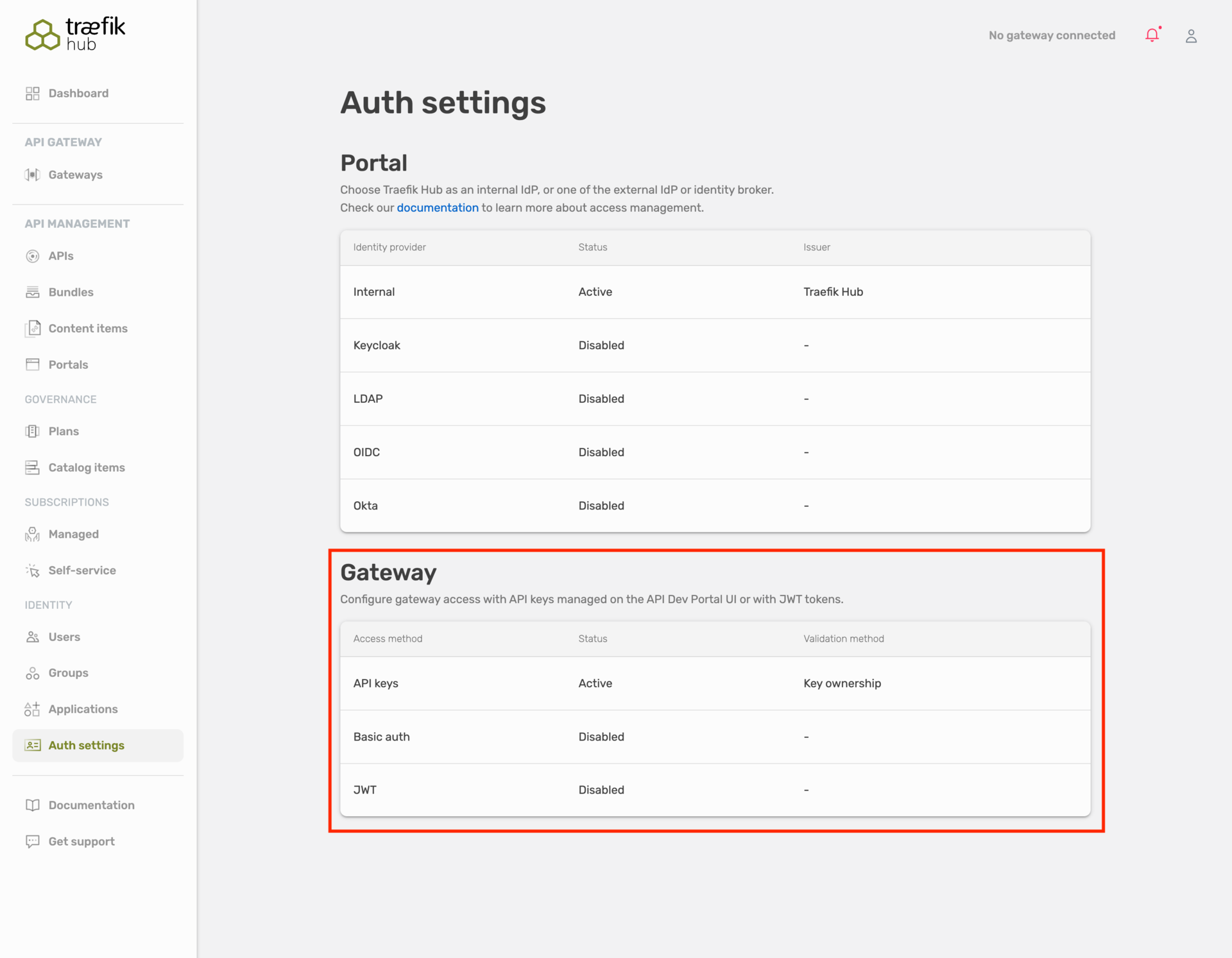
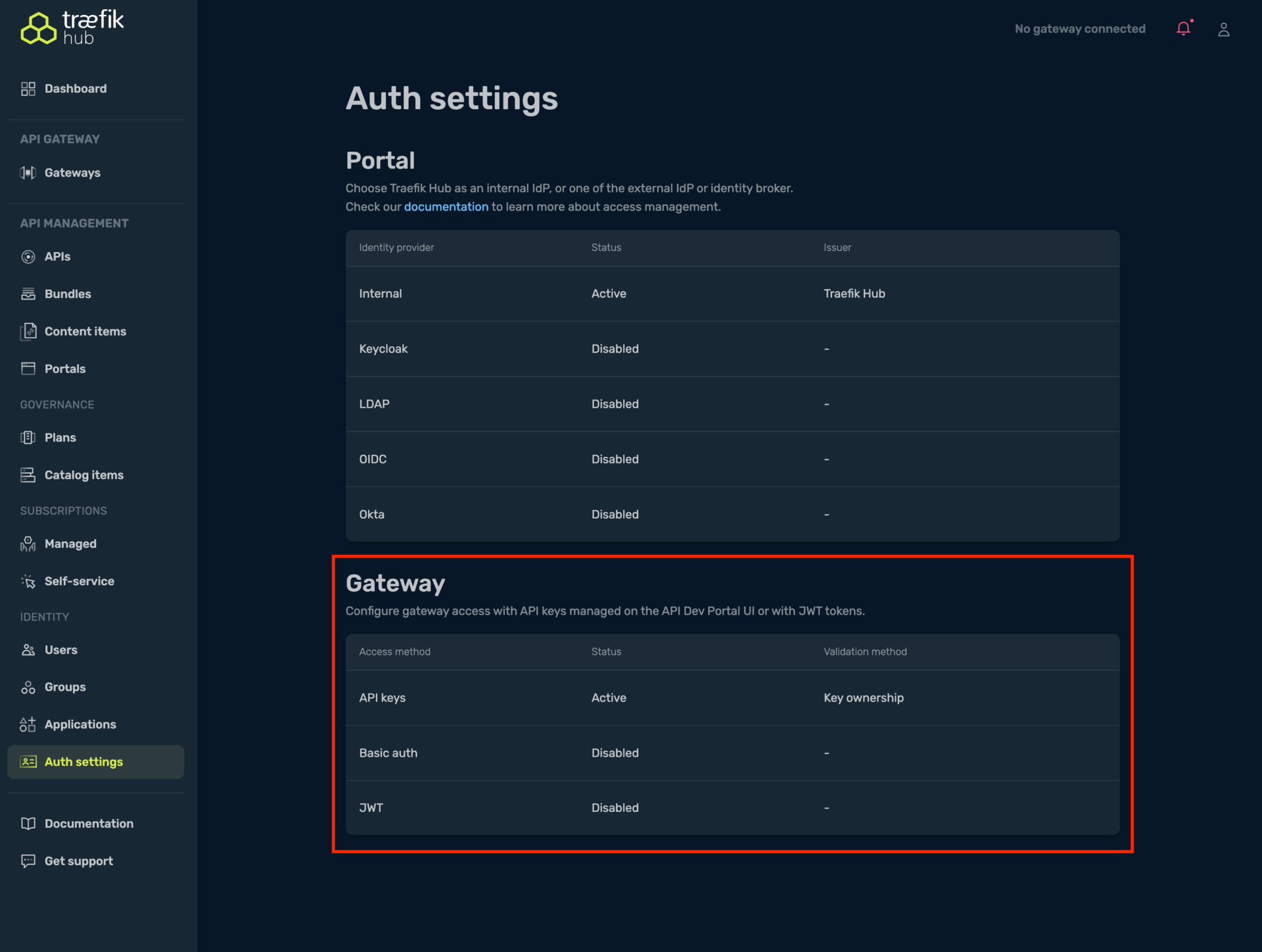
- UI Configuration: Convenient for quick setup and testing, configuration stored in Traefik Hub platform. The UI setting is global for the entire workspace and applies to all APIs across all clusters and namespaces.
- CRD Configuration: Infrastructure as Code approach, version controlled, essential for offline environments. APIAuth CRDs are namespace-scoped, allowing different authentication methods per cluster or per namespace within the same workspace.
- Precedence: CRD configuration takes precedence over UI configuration when both are defined
This namespace-scoped approach enables advanced scenarios like having JWT authentication in the payments namespace,
API Key authentication in the public namespace, and LDAP authentication in the internal namespace - all within the same workspace on the same gateway.
Migration from Dashboard Configuration
When migrating from online dashboard authentication to APIAuth CRDs:
- Identify Current Settings: Note your authentication configuration from the online dashboard
- Create APIAuth Resource: Convert dashboard settings to APIAuth CRD format
- Deploy and Validate: Use the Traefik Hub static analyzer to ensure correct configuration
- Test Authentication: Verify that APIs continue to authenticate properly
Migration Example
Dashboard JWT configuration with Auth0:
- JWKS URL:
https://auth.company.com/.well-known/jwks.json - App ID Claim:
azp - Forward email as header:
X-User-Email
Equivalent APIAuth CRD with Auth0:
apiVersion: hub.traefik.io/v1alpha1
kind: APIAuth
metadata:
  name: migrated-auth
  namespace: default
spec:
  isDefault: true
  jwt:
    appIdClaim: cid
    jwksUrl: https://your-domain.auth0.com/.well-known/jwks.json
    forwardHeaders:
      X-User-Email: email
Troubleshooting
- APIs not authenticating: Ensure
APIAuthresource exists in the same namespace as your APIs withisDefault: true. - Multiple authentication methods: Verify only one authentication method (apiKey, jwt, ldap, or keyless) is specified in the
APIAuthresource. - JWT verification failing: Check that your JWKS URL is accessible and contains the correct public keys.
- Missing application identifier: Ensure the
appIdClaimmatches the claim name in your JWT tokens. - Trusted issuers validation errors:
- Verify all
jwksUrlvalues use HTTPS (HTTP is not allowed) - Check that issuer values are unique across all trusted issuers
- Ensure only one trusted issuer omits the
issuerfield (fallback) - Confirm the
issclaim in your JWT exactly matches the configured issuer value, including trailing slashes
- Verify all
- Trusted issuers mutual exclusivity: If you receive an error about multiple JWT verification methods, ensure you're using only
trustedIssuersand not combining it withjwksUrl,jwksFile,publicKey, orsigningSecretName. - LDAP authentication failing: Verify LDAP server connectivity, bind credentials, and that the username matches a ManagedApplication
appId. - API still enforcing authentication after adding
keyless: {}: If the keylessAPIAuthis the namespace default, confirmisDefault: trueis set and that no otherAPIAuthresource withisDefault: trueexists earlier alphabetically in the same namespace. If the API has its ownapiAuths, the namespace default has no effect on it. Reference the keylessAPIAuthfromapiAuthsinstead. - API using
apiAuthsreturns401for an operation you expect to be reachable: Confirm every operation is covered by at least oneapiAuths[].operationFilter.include, or omitoperationFilteron an entry to cover every operation. See How the Authentication Chain Works. - API using
apiAuthsrejects every request, or accepts a method you didn't expect: Check theAPIAuthRefsResolvedcondition on theAPIorAPIVersion. An unresolvedapiAuths[].nameis skipped rather than rejecting every request outright, and it never falls back to the namespace default, so the chain still answers with whatever entries did resolve. - Applying an
APIorAPIVersionwithapiAuthsfails validation: Confirm everyoperationFilter.includevalue matches a name defined inopenApiSpec.operationSets. Kubernetes rejects the resource at apply time otherwise.
Related Content
- Learn more about the APIPortalAuth in its dedicated section.
- Learn more about ManagedApplication in its dedicated section.
- Learn more about the API object in its dedicated section.
- Learn more about Offline Mode in its dedicated section.
